

Incorrect Section 1 Citizenship and Section 2 Document
Summary
In rare cases, an employee may indicate an incorrect employment status in Section 1 of Form I-9. If the I-9 Manager identifies this error before Section 2 is completed, the employee should be instructed to correct the error in Section 1. However, if Section 2 has already been completed and the I-9 Manager has recorded documents that are valid only for the incorrect employment status selected in Section 1, the Tracker I-9 system does not allow the employee or the I-9 Manager to correct the error due to system validation rules.
Common Scenarios
The most common scenario where this issue arises is when the employee incorrectly selects Legal Permanent Resident (LPR) or Alien Authorized to Work (AATW) status, when in fact they hold a different status. Often when the employee incorrectly selects LPR status, they hold AATW status or vice versa.
Then, the I-9 Manager incorrectly selects a Section 2 document that matches the incorrect status. For example, the I-9 Manager incorrectly selects the List A Document, Employment Authorization Document (Form I-766). Typically, the employee presented a Legal Permanent Resident Card (Form I-551), but this document option was not selectable in Section 2, so the I-9 Manager – in the interest of completing the Form I-9 and not knowing what to do – selects an incorrect document.
The issue gets discovered in one of three ways (in order of frequency):
- E-Verify Issue: If the Form I-9 is subject to E-Verify, the E-Verify case will enter a TNC state if the document information and status are not changed.
- Reverification Next Action Issue:
- When employee holds LPR status: If the Form I-9 Next Action updates to Reverification Due when the I-9 Manager asks the employee for an updated work authorization document, the employee may consider the request unusual (since almost all employees holding LPR status do not require reverification), and the issue is potentially discovered.
- When the employee holds AATW status: The employee may elect to present an updated work authorization document to the employer, and when the employer researches the employee’s I-9, the issue is discovered.
- Internal Audit: The issue is discovered during an internal audit.
When the employee attempts to edit the Section 1 status, the following error occurs:
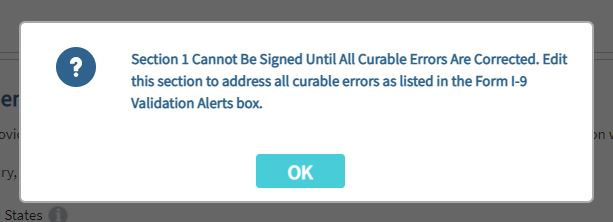

When the I-9 Manager attempts to update the Section 2 documents, the following error occurs:
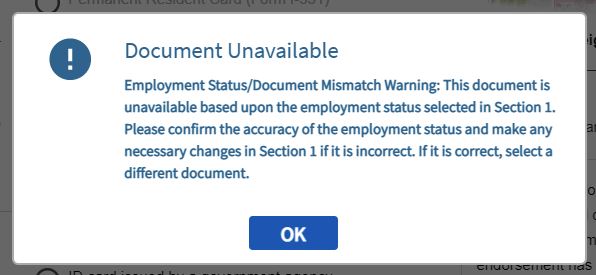
Resolution Steps
Scenario 1
The employee entered the incorrect status in Section 1 at the time they completed Section 1. For example, the employee’s status was Legal Permanent Resident (LPR) but they incorrectly indicated that they hold Alien Authorized to Work (AATW) status. Under these conditions, we would recommend that the client:
Review the Section 2 documents
The I-9 Manager recorded documents that are only valid for an AATW employee.
Identify substantive errors
- If the Section 2 documents are not valid for an LPR employee, the Form I-9 likely contains two substantive errors:
- Incorrect employment status in Section 1
- Incorrect document(s) in Section 2.
- If these conditions are true, both the I-9 Manager and the employee attested under penalty of perjury that invalid information was true in Section 1 and Section 2, creating two such substantial errors on the Form I-9. Due to this, the Form I-9 is considered invalid and beyond reasonable repair. Mitratech recommends creating a new Form I-9 because the existing Form I-9 is beyond repair.
Create a new Form I-9
- Before creating the new Form I-9, the client should:
- Download the original Form I-9 and supporting assets, including:
- Audit trail
- Attachments
- Audit notes (if any)
- E-Verify case history (if any)).
- Delete the original Form I-9.
- Download the original Form I-9 and supporting assets, including:
- When creating the new Form I-9, enter the original start date.
- The signature dates will be late, so add an Audit Note explaining the reason why a new Form I-9 was needed.
- Consider adding a comment to the Audit Note that an internal audit revealed that there were multiple errors on the original Form I-9 that warranted creating a new one, or something to this effect.
- Upload the saved documents and assets from the original Form I-9 to the new Form I-9 record.
Scenario 2
In this scenario, the employee selected the correct employment status in Section 1 at the time of hire, and the I-9 Manager correctly recorded the identity and employment authorization documents. At a later date, the employee’s status changes, most commonly from Alien Authorized to Work (AATW) to Legal Permanent Resident (LPR).
- Ask the employee to present any acceptable document from the List A or List C document set.
- Create a new Section 3 and record the document information.
- Do not update the Section 1 employment status, since the USCIS guidelines state that it is not necessary to update an employee’s citizenship status change in Section 1.