

How to Change a Remote I-9 to the Network Alliance Workflow
This shows how an I-9 manager can change a remote Form I-9 to the Network Alliance workflow.
Goal
A remote I-9 (Employer Appoint/Employee Appoint) can be changed to the remote Network Alliance workflow.
Change a Remote Form I-9 to the Remote Network Alliance I-9 Workflow.
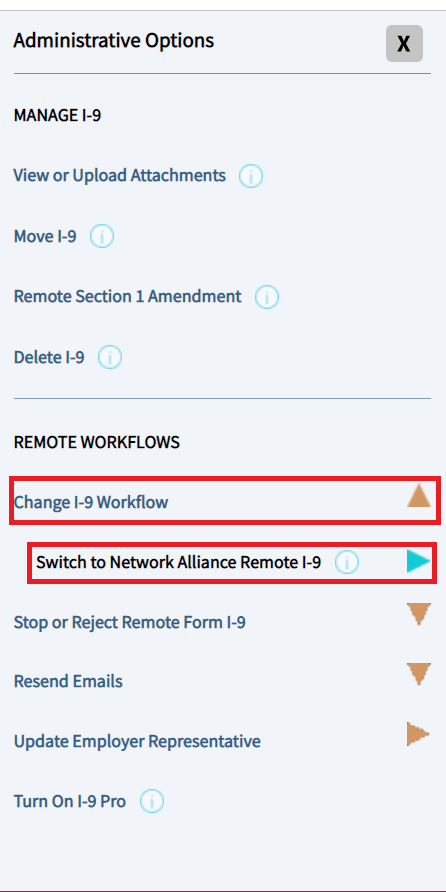
- Navigate to the Form I-9 and click on the I-9 Administrative Options menu on the Remote I-9 or the Employee Appoint I-9 tab.

- Under Remote Workflows, select "Change I-9 Workflow".
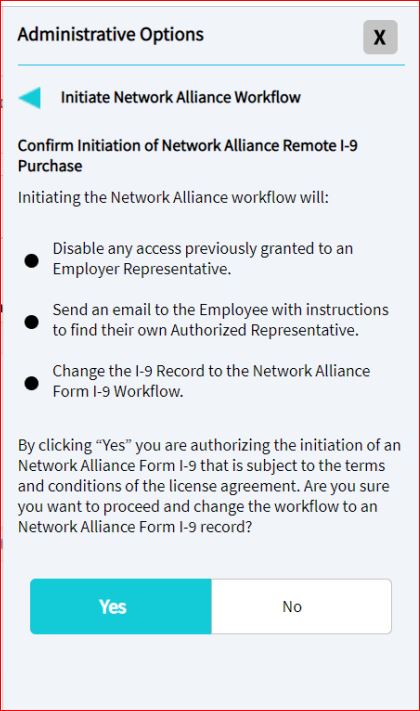
- Select "Switch to Network Alliance Remote I-9" and confirm.
What's Next?
See How to Schedule a Network Alliance Appointment for the employee's next steps.
If the employee needs the email to be resent, see How to Resend a Network Alliance Email.