

2026_108 - April 2026
What's New?
Distributor Packages Enhancements
Note: These updates apply only to partners and resellers using Distributor functionality.
This release introduces enhancements to Distributor Packages to give you greater control over client configuration, reduce the risk of misconfiguration, and improve reporting visibility across your distributor network.
Improved safeguards when inactivating Distributor Packages
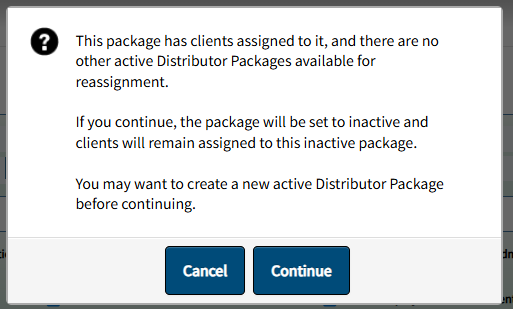
Distributor Admins can now make more informed decisions when changing a Distributor Package to inactive, especially in scenarios where clients are still assigned.
- Clearer guidance when no alternative packages exist
If you attempt to inactivate a package that still has assigned clients, and no other active packages are available, you’ll receive an additional notification explaining the impact. - Reduced risk of unintended configuration issues
The system clearly communicates that clients will remain assigned to the inactive package, helping you avoid unexpected downstream effects. - Actionable next steps
You’re prompted to consider creating a new active package before proceeding, giving you greater control over how client assignments are managed.
These updates help prevent accidental disruptions and ensure better alignment across client configurations.
Stronger configuration control for Distributor-managed clients
To maintain consistency across clients using Distributor Packages, we’ve introduced additional safeguards within the Client Admin experience.
- Enforced configuration consistency
When a client is assigned to a Distributor Package, the Features page is now read-only for Client Admin users. This ensures configurations defined at the package level remain consistent across all assigned clients. - Clear visibility into package assignment
A Distributor Package summary is now displayed on the Features page, providing transparency into which package is governing the client’s configuration. - No impact when packages are not in use
If a client is not assigned to a Distributor Package, Client Admin users retain full control and can continue managing settings as before.
These changes help distributors maintain standardized configurations while still supporting flexibility where needed.

Enhanced reporting for Distributor and Package visibility
We’ve expanded the Export All Records to Excel report on the Client List View page to provide more transparency into distributor and package relationships.
- New distributor identifiers
Easily reference both internal and external Distributor IDs directly in the export. - Clearer package identification
The existing Distributor Package field has been renamed to External Distributor Package ID for clarity. - Added package name visibility
A new Distributor Package Name column allows you to quickly identify which package each client is associated with.
These improvements make it easier to audit configurations, support client inquiries, and analyze distributor relationships without additional lookup steps.

For more information, refer to the Distributor Packages Feature Guide. If you have any questions, please contact the Tracker I-9 Support Team by creating a case on the Support Portal.
Form I-9 Updates
Support extended for Form I-9 Edition 01/20/25
Note: This update applies to customers using Historical I-9 and I-9 Resolve workflows.
Support for Form I-9 Edition 01/20/25 has been extended to Historical I-9 and I-9 Resolve workflows, providing consistent form usage across these areas.
Bug Fixes
- Fixed an issue where the Custom Report “Search by I-9 ID” error message displayed an incorrect example including spaces after commas, contrary to the required input format.
- Fixed an issue where the system incorrectly displayed a “Complete E-Verify” status even though the E-Verify case had already been completed and closed.
- Fixed an I-9 Resolve issue where validation errors for a third List A document were incorrectly triggered associated with Foreign Passport with I-94 or I-94A document types. The system now correctly allows this document combination without requiring additional third List A document details.
- Fixed an issue where the “E-Verify FNC Received” field in I-9 Custom Reports showed incorrect values for Final Non-Confirmation cases.
- Fixed an issue where in some cases the Section 3/Supplement B audit trail displayed incorrect and/or incomplete document details.
- Fixed an issue where the tooltip for the Reverification Due Date field in a completed Section 3/Supplement B displayed no content.