

Mitratech Success Center
Client Support Center

Need help? Click a product group below to select your application and get access to knowledge articles, webinars, training content, and release notes or to contact our support team.

Authorized users - log in to create a ticket, view tickets status and check your success plan details.


Deleting a Person

The ability to delete a record is determined by the System Administrator.

To Delete a Record:

  1. Open the People module.
  2. On the People List page, select an entry in the list of people.
  3. Click Delete.
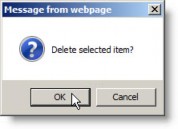
  4. On the confirm deletion message box, click OK.
    þÿ
  • Was this article helpful?