

Best Practice when using Distribute To New User
Using PolicyHub helps you manage the on boarding of any new employees by ensuring that they are automatically sent the policies they need to read, acknowledge and have access to.
Tips and Tricks
Introduction |
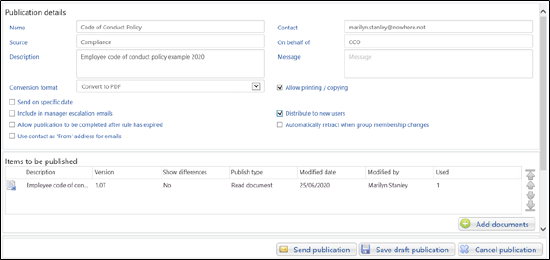
This is achieved by ticking the ‘Distribute to new user’ option when creating a publication. In order for this option to work correctly, there are a number of items that need to be taken into consideration. |
 |
Using the correct Recipient Lists |
Distributing to new user only works with recipient lists that contain one or many of the groups that are imported (synchronized) into PolicyHub every 24 hours | 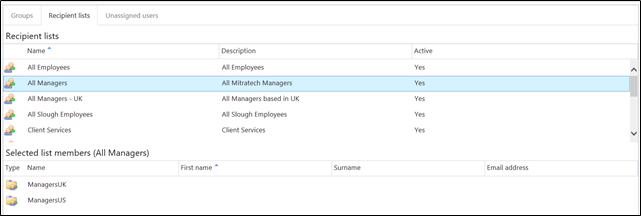 |
| Just updating a recipient list by adding one or more employees, or by adding a group, does not trigger the distribute to new user process | 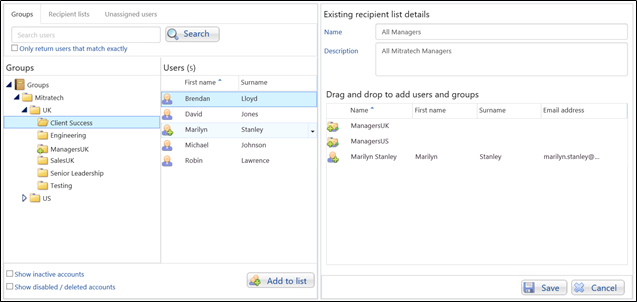 |
|
| When creating the publication, if you use a recipient list that contains individuals and tick ‘Distribute to new user’, you will be warned that the publication won’t be sent to anybody new added to the recipient list | 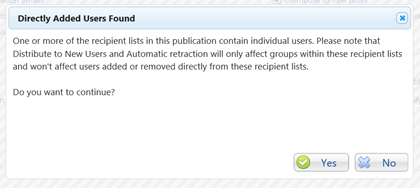 |
|
Deactivating DTNU on Older Publications |
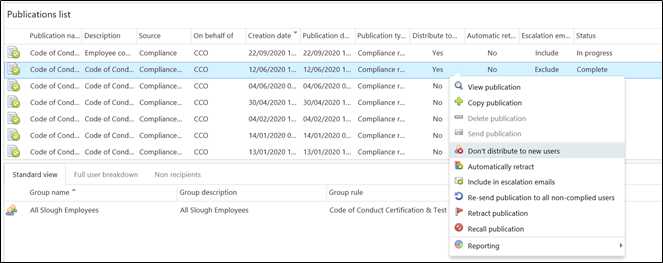
When you publish a new version of a policy to the same set of people for attestation, you should go back and switch off distribute to new user on the previous publication. Otherwise, any new employees will receive both the previous and the new publication in their My Inbox. Go to the publications list for the policy, right-click on the previous publication and select ‘Don’t distribute to new users’ |
 |